

If you’re planning a WordPress site, the Elementor vs Bricks Builder question comes up fast. Both are visual builders, and both can produce a professional business website. But they differ in how they work, what they cost to maintain, and who they suit. I build client sites with both, so this is a practical comparison rather than a feature-list dump.
The short version: Elementor is the safer, more familiar choice. Bricks Builder is the leaner, more developer-friendly choice. Which one is right depends on your site, your team, and who will edit it after launch.
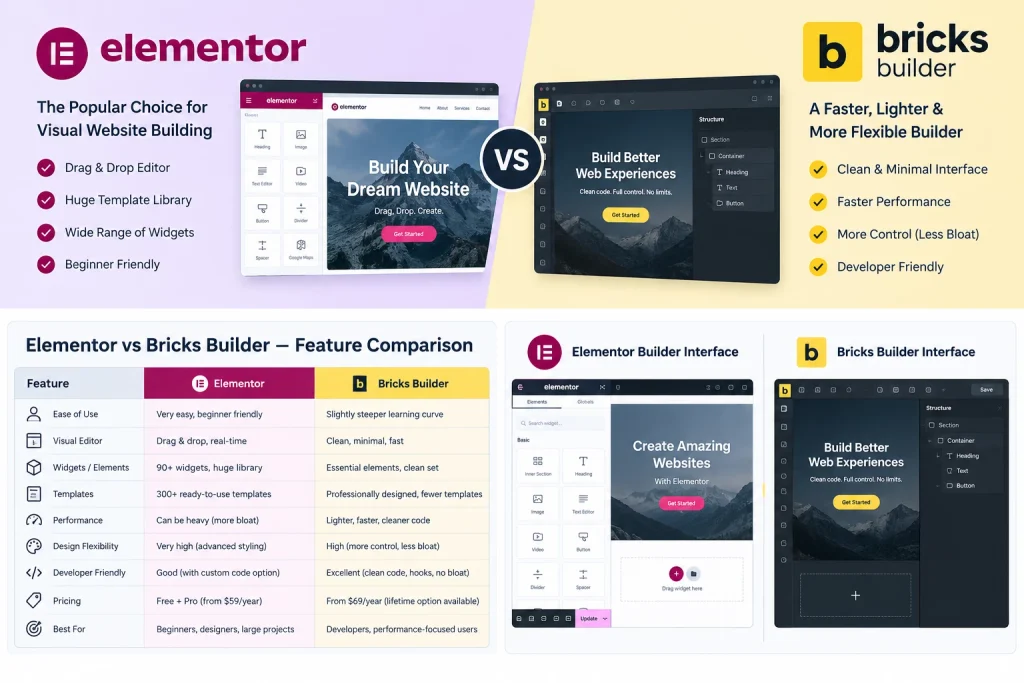
Elementor vs Bricks Builder: Quick Comparison
| Type | Elementor / Elementor Pro | Bricks Builder |
|---|---|---|
| Type | Plugin (works with most themes) | Theme (Bricks must be your active theme) |
| Free version | Yes, limited. Pro needed for theme builder, popups, forms | No, paid only |
| Front-end code | Heavier markup in general | Typically cleaner, lighter markup |
| Ecosystem | Very large (add-ons, templates, tutorials) | Smaller but growing |
| Dynamic content | Dynamic tags and loop builder in Pro | Built-in query loop and dynamic data |
| Learning curve | Gentler for beginners | Steeper, rewards technical users |
| Easiest to hand off to a non-technical client | Usually yes | Possible, but less familiar to most |
Check each vendor’s site for current pricing and licence terms, since both change them from time to time.
What Is Elementor Best For?
Elementor is the most widely used WordPress page builder, which gives it real practical advantages:
- Familiarity. Many marketers, in-house teams, and freelancers already know it. If your client wants to edit pages themselves, that matters.
- Ecosystem. There are many third-party add-ons, templates, and tutorials, so you will rarely be stuck without an answer.
- Everything in one place. Elementor Pro covers theme templates (header, footer, single posts), popups, forms, and WooCommerce page templates.
The trade-off is that Elementor output is generally heavier than a leaner builder, and a site with many add-ons can slow down if it isn’t built carefully. This is manageable with good hosting, optimized images, and a restrained plugin list, but it takes deliberate effort.
What Is Bricks Builder Best For?
Bricks is a builder aimed at people who care about how the site is built under the hood:
- Cleaner output. It generally produces lighter markup, which helps when you’re chasing good page speed.
- Built-in dynamic features. Query loops and dynamic data are part of the core builder, which suits sites that use custom post types and custom fields (for example with ACF or JetEngine).
- Fine control. Class-based styling, global settings, and custom code options appeal to developers who want precise control.
The trade-offs: there is no free version, the community and template library are smaller, and many clients will have never heard of it. If someone else will maintain the site later, make sure they’re comfortable with it.
Which One Should You Choose?
Choose Elementor if:
- You or your team will edit pages regularly without a developer.
- You want the widest choice of add-ons, templates, and support resources.
- You may hire different freelancers over time and want a builder most of them already know.
Choose Bricks Builder if:
- Page speed and clean code are a priority.
- Your site is dynamic: custom post types, listings, directories, or heavy use of custom fields.
- A developer will manage the site long-term.
For WooCommerce stores: both work. Elementor Pro has dedicated WooCommerce templating. Bricks supports WooCommerce too, with more manual setup. The best choice depends on how custom your product and checkout layouts need to be, not on which builder is “better” in general.
A Warning That Applies to Both: Builder Lock-In
Whichever you pick, you’re committing to it. If you later deactivate either builder, your page content doesn’t convert cleanly back to normal WordPress content. Switching builders usually means rebuilding pages. Choose based on where the site will be in three years, not just on what’s easiest this week.
Speed also doesn’t come from the builder alone. Hosting, image sizes, caching, and the number of plugins all matter as much. Neither builder will make a badly optimized site fast.
Frequently Asked Questions
Is Bricks Builder faster than Elementor?
Bricks typically outputs leaner code, which gives it a head start. But real-world speed depends on hosting, images, scripts, and plugins. A well-built Elementor site can outperform a poorly built Bricks site.
Can I switch from Elementor to Bricks later?
Not with a one-click conversion that preserves your design. Expect to rebuild pages manually, so decide before you build.
Which builder is better for SEO?
Neither builder ranks a site on its own. Clean markup, fast loading, proper heading structure, and good content matter more. Both let you control these when used correctly.
Do I need Elementor Pro?
For a business site, usually yes. Theme builder, popup builder, and form features are in Pro, not the free version.
Need Help Choosing or Building?
If you’re deciding between the two for a new site or a redesign, I can build it in either one. See my WordPress development service or get in touch with a short description of your project.