

A GoHighLevel round robin calendar lets customers book one generic slot (“Book an Estimate”, “Book a Call”) while GoHighLevel decides which team member gets the appointment. No one assigns leads by hand, and no one rep gets buried while another sits idle.
This guide covers how to build the calendar, how GoHighLevel picks the rep, what happens when a booking is rescheduled, and which workflow to attach so every booking gets confirmed and reminded automatically.
What a GoHighLevel round robin calendar does
GoHighLevel has several calendar types. A personal calendar sends every booking to one person. A round robin calendar is shared by several users, and each new booking is distributed among them automatically.
Use round robin when:
- You have two or more salespeople, estimators or technicians taking the same kind of appointment.
- You want one booking link on your website, in SMS and in email, instead of one link per person.
- You want bookings to respect each person’s real availability.
If you are a solo operator, a personal calendar is enough.
How to create a round robin calendar in GoHighLevel
- Open your sub-account and go to the Calendar settings.
- Create a new calendar and choose Round Robin as the type.
- Add your team members first. A round robin calendar needs users attached before it can distribute anything.
- Set each user’s availability, appointment duration and any buffer time.
- Connect each user’s Google Calendar or Outlook if they use one, so personal commitments block time and nothing gets double-booked.
- Publish the booking link and embed it on your website or send it by SMS.
Exact menu labels change as GoHighLevel updates its interface, so follow the wording you see in your own account.
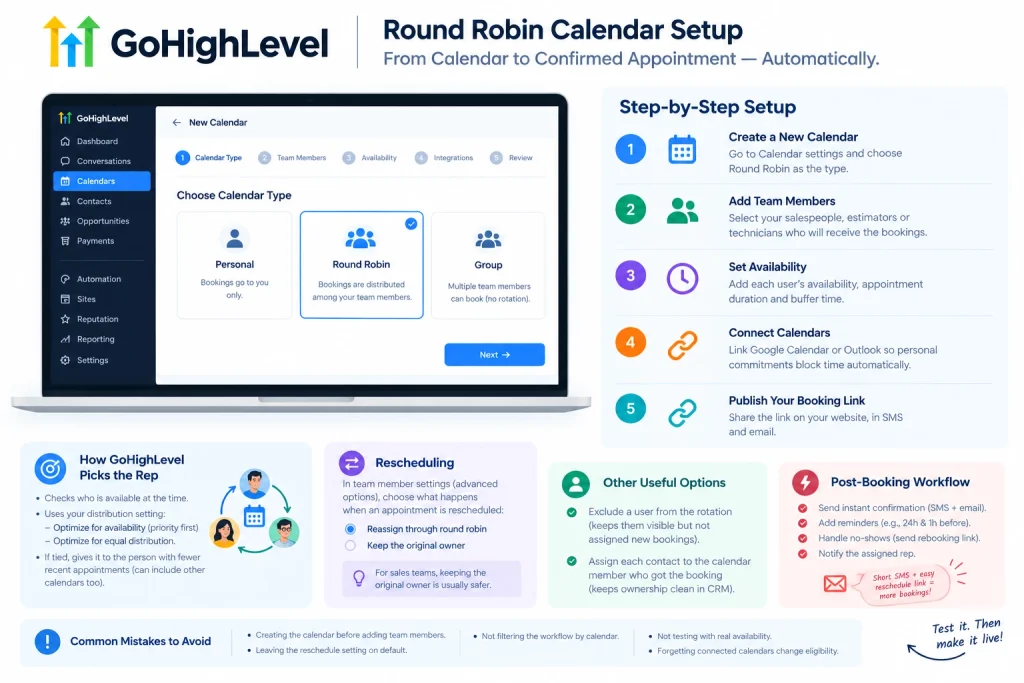
How GoHighLevel decides who gets the appointment
When someone books, GoHighLevel checks which linked users are available at that time, then applies the round robin logic you configured. There are two approaches:
- Optimize for availability. Users with higher priority are offered bookings first.
- Optimize for equal distribution. The goal is an even spread of appointments.
When two available users are tied, GoHighLevel compares how many appointments each has recently and gives the new one to the person with fewer. Published tutorials describe this as a count over a recent window, and they note that a user’s appointments from other calendars can be counted too. That last detail matters: a rep who is heavily booked on a different calendar can get fewer bookings from this one. Test it with a dummy calendar before you rely on it.
What happens when an appointment is rescheduled
This is the setting most people miss. In the round robin calendar’s team member settings (under advanced options), you choose what happens to a rescheduled booking:
- Reassign through round robin. The new time can go to any available team member.
- Keep the original owner. The rep who first got the lead keeps it.
For sales teams, keeping the original owner is usually safer. The rep who spoke to the lead already has context, and reassigning on reschedule can confuse the customer. There is also a related option to assign each contact to the calendar team member who got the booking, which keeps ownership clean inside the CRM.
How to exclude someone from the rotation
Not everyone on the calendar should receive new bookings. GoHighLevel lets you keep a user visible on the calendar while excluding them from round robin distribution. Use this for a manager who needs to see the schedule, or a rep who is on leave.
Build the workflow that runs after booking
The calendar only assigns the appointment. The follow-up comes from a workflow.
- Go to Automation, then Workflows, and create a new workflow.
- Use the appointment/booking trigger and add a filter for this specific calendar. Without the filter, the workflow fires for every calendar in the account.
- Send an immediate confirmation by SMS and email.
- Add reminders, for example 24 hours and 1 hour before the appointment.
- Add a no-show branch that sends a rebooking link when the appointment passes without a status update.
- Notify the assigned rep so they see the booking.
Keep the SMS short and put the reschedule link in it. People reschedule more readily when it takes one tap.
Common mistakes
- Creating the calendar before adding team members.
- Leaving the reschedule setting on default and then wondering why leads change owners.
- Running the post-booking workflow with no calendar filter.
- Not testing with real availability. Book two or three dummy appointments and confirm they land where you expect.
- Forgetting that blocked time in a connected Google or Outlook calendar changes who is eligible.
FAQ
What is a round robin calendar in GoHighLevel?
It is a shared calendar where new appointments are automatically distributed among the selected team members, based on availability and your distribution settings.
Can I stop a rescheduled appointment from going to a different rep?
Yes. In the team member settings you can choose to keep the original owner instead of reassigning through round robin.
Do I need a workflow with a round robin calendar?
You don’t need one for the assignment to work, but you need one for confirmations, reminders and no-show follow-up.
Need this set up for your team?
I set up GoHighLevel calendars, pipelines and follow-up workflows for small businesses. If you want a round robin booking system built and tested inside your own account, get in touch.
Follow me on linkdin.